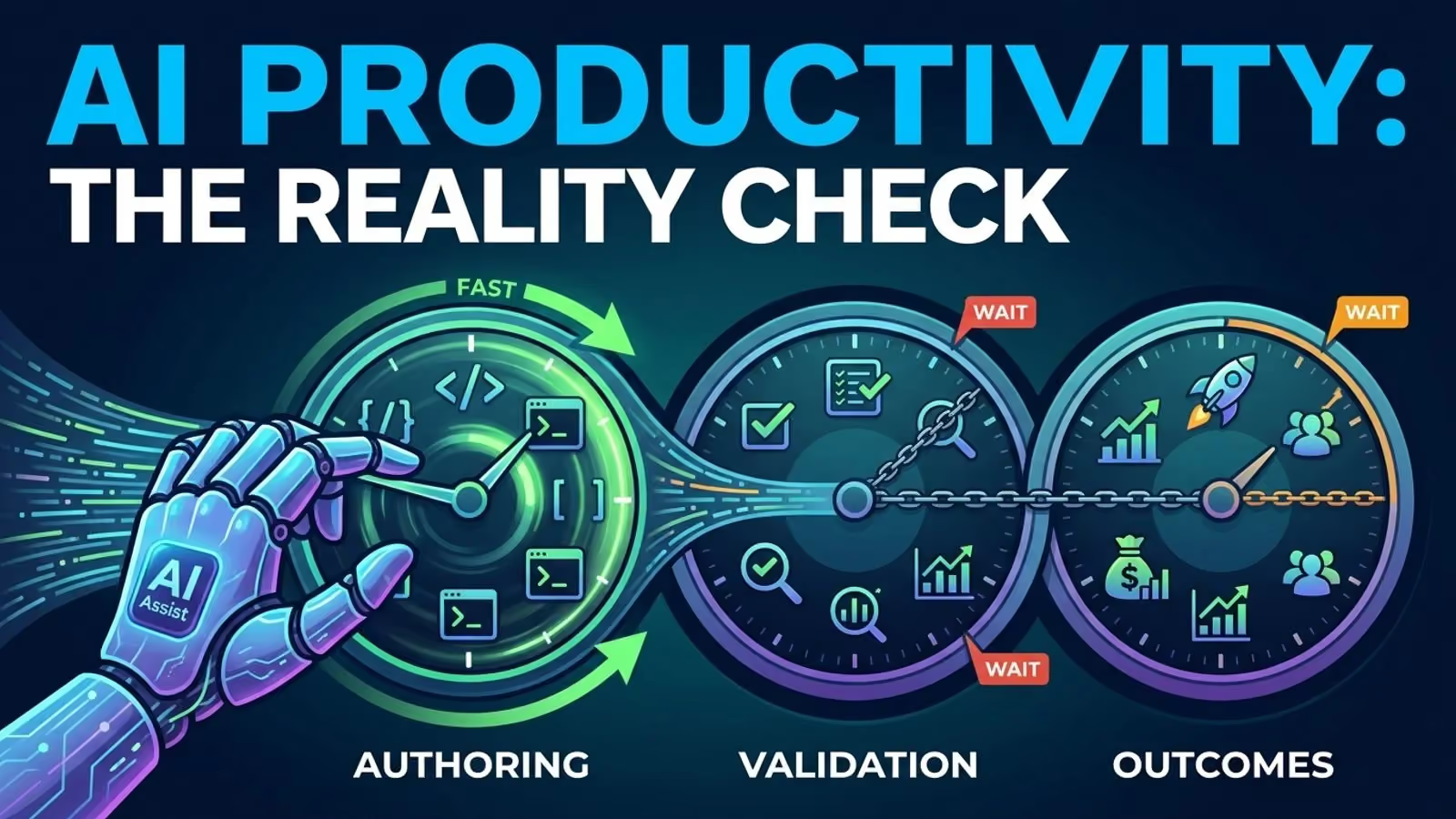
If you ask an assistant for a rate limiter, you’ll get one almost instantly. That part is clear. The real challenge comes later, when someone has to check if it’s right, if it fits the codebase, and if anyone can fix it months down the line.
It’s now clear that research on AI’s effect on developer productivity is split. The differences are big enough that you can tell exactly what question each study set out to answer.
The studies disagree, and that’s the useful part
Pay attention to the nouns. They do most of the work here.
- The experiment involving Copilot. Ninety-five professional programmers were given one JavaScript HTTP server task. The group that used Copilot completed the task 55.8% faster. This was a timed exercise, with speed being the only criterion, and the control group being allowed to search the web.
- In Google’s enterprise trial in 2024, there were 96 full-time engineers, three internal AI features, and one complex enterprise task. The best estimate was that task completion time was about 21% lower, with a confidence interval which the authors described as large.
- In 2025 field experiments were carried out at three companies, with Copilot access randomly assigned to developers inside Microsoft, Accenture, and an unnamed company from the Fortune 100 list - 4,867 developers in all - and the combined results showed 26.08% more tasks being completed, 13.55% more commits, and 38.38% more builds. This reflects increased activity, not increased value.
- METR, 2025. There were sixteen seasoned open-source developers, 246 actual issues, and the repositories that they had contributed to over the years. When the AI-allowed tasks were carried out, they took 19% longer. Initially, the developers had expected a 24% speedup, but by the end of the experiment they still thought they had been 20% faster.
- DORA 2024. A 25% increase in AI adoption was associated with better documentation (an increase of 7.5%), improved code quality (a gain of 3.4%), and faster review speeds (an increase of 3.1%), together with an estimated decrease of 1.5% in delivery throughput and a 7.2% decline in stability.
- DORA 2025 and Stack Overflow 2025. 90% of the people who took the DORA survey use AI in their work and more than 80% think that it has made them more productive, although 30% say that they have little or no trust in the code it generates. Stack Overflow reported that 46% of developers distrust the accuracy of the output whereas 33% trust it.
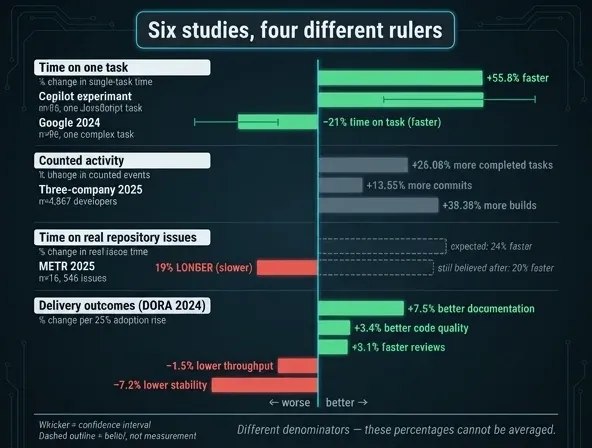
If you line up the studies, a pattern shows up. Bounded tasks went up, measured activity increased, but real work done by repository owners went down. At the system level, delivery numbers moved on their own.
Why the same tool produces opposite results
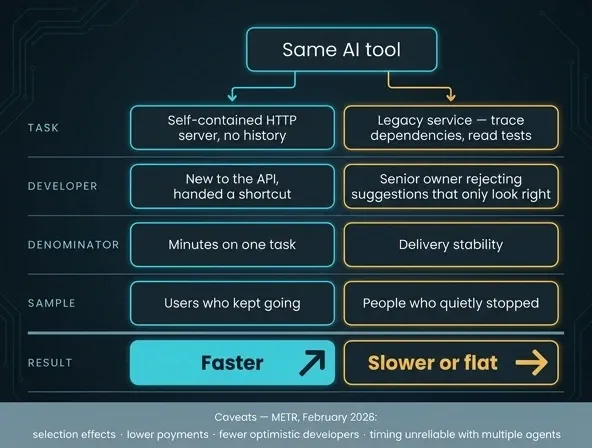
There are four factors that matter more than the tool itself.
The scope of the task. For a model, having a self-contained HTTP server is a valuable asset since it involves a well-known pattern and a familiar API, and there is no history to deal with. In contrast, when modifying a legacy service you have to trace out the dependencies, read the tests, and figure out why the odd part is odd.
Who’s using the keyboard matters. Someone new to an API gets a shortcut, while a senior engineer in charge of the code will turn down suggestions that only look right.
The denominator. The same term is used for six different things: minutes spent, items finished, commits, builds, self-rated speed, and delivery stability. But a study about commits only tells you about commits.
Who stayed in the sample. Developers who didn’t like the tool just stopped using it, so surveys only show the opinions of those who kept going. METR’s February 2026 update is clear about this: their follow-up experiment was unreliable because of selection effects, lower payments, fewer optimistic developers, and timing issues when people ran multiple agents at once.
Three clocks are running
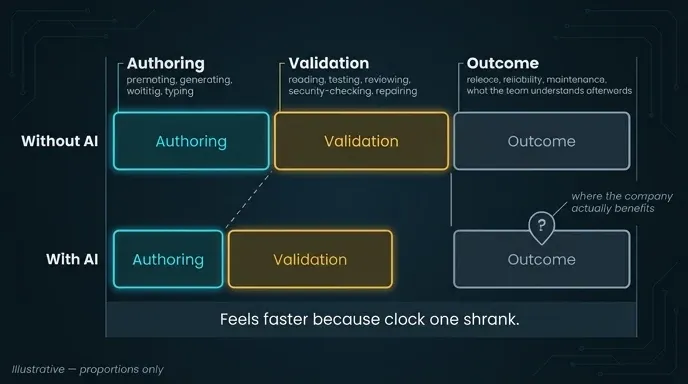
Here’s how I see it: every change to the codebase involves three clocks.
- Authoring: prompting, generating, waiting, typing.
- Validation includes reading, testing, reviewing, security-checking, and repairing.
- Outcome: release, reliability, maintenance, and the team’s subsequent understanding.
Generative AI shortens the first phase, which is what people notice. That’s why it feels faster, even if the stopwatch says otherwise. The real cost comes in the second phase, and the third phase is when the company actually benefits.
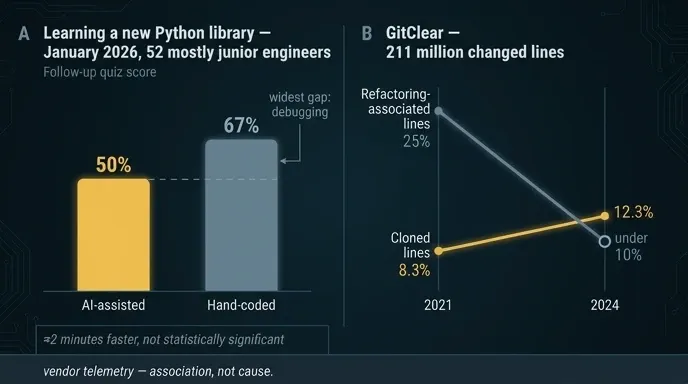
There are two reasons why the third clock is now clear. First, in a January 2026 experiment, 52 mostly junior engineers learned a new Python library, with half using AI help. The AI group finished about two minutes faster, but this wasn’t a significant difference, and they scored only 50% on a quiz compared to 67% for those who coded by hand. The biggest gap was in debugging. Second, GitClear’s review of 211 million changed lines found that refactoring dropped from 25% of changes in 2021 to under 10% in 2024, while code clones rose from 8.3% to 12.3%. These numbers come from vendor telemetry. They don’t prove cause, but they’re a good reason to check your own code duplication and churn.
Pick tools by bottleneck, not by feature list
The AI developer productivity tools that arrived through 2025 and 2026 fall into categories, not a leaderboard:
- inline completion and IDE chat, for boilerplate, unfamiliar APIs, and explanations
- contextual assistants that pull repository context into multi-file edits
- agentic IDEs that plan, edit, run tests, and iterate
- terminal and cloud agents you hand a whole task to
- review, test, and documentation assistants
- security and dependency scanners
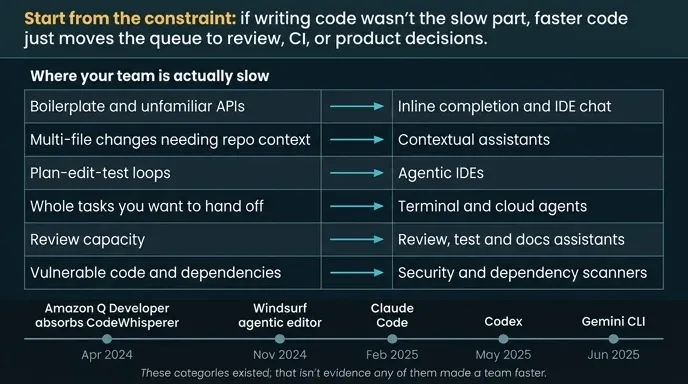
Announcements about new tools, like Amazon Q Developer adding CodeWhisperer in April 2024, Windsurf’s agentic editor in November, Claude Code in February 2025, Codex in May, and Gemini CLI in June, show these categories exist. But that doesn’t mean any of them made developers faster. Start by looking at your bottleneck: if writing code wasn’t slowing you down, making more code faster just shifts the delay to review, CI, or product decisions.
Running your own evaluation
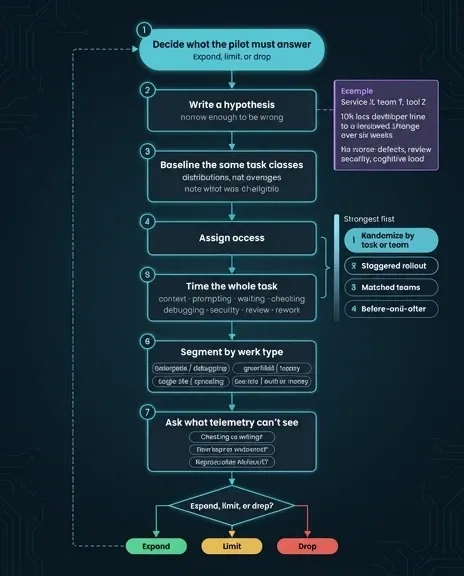
Before you start measuring, decide whether to expand, limit, or drop the tool. That’s what a pilot project should do. If you skip this step, you just end up with a dashboard full of data. Also, set a hypothesis that’s specific enough to be proven wrong:
For routine test and documentation changes in service X, if team Y is given access to tool Z then the time developers take to produce a reviewable, passing change will be reduced by 15% over a period of six weeks, without there being an increase in the number of defects that escape, the amount of review work, the number of security findings, or the cognitive load.
From there:
- Set the same task categories that you plan to pilot on, using distributions rather than averages, and note the amount of work that was actually eligible for AI assistance.
- As far as you can, randomize it. It is better to grant access according to task or team than to carry out a staggered rollout, which in turn is better than assigning people in matched teams, which is better than using a before-and-after approach.
- Time the entire task: gathering the context, issuing the prompts, waiting, checking, debugging, carrying out the security checks, reviewing and making any necessary amendments. Call it a win because the amount of keyboard input went down, and the supervision cost quietly disappears from the records.
- Classified by type of work: boilerplate is opposed to debugging, greenfield to legacy, single-file to sprawling, and low-risk to any situation involving authentication or money. One average figure masks a tool which helps in one column but causes problems in the other.
- Ask people about things that telemetry is unable to observe. Was the cost of checking the output greater than the cost of writing it? Was the flow kept intact or destroyed? Could the result be reproduced without the use of the tool?
Some numbers belong nowhere near a performance review
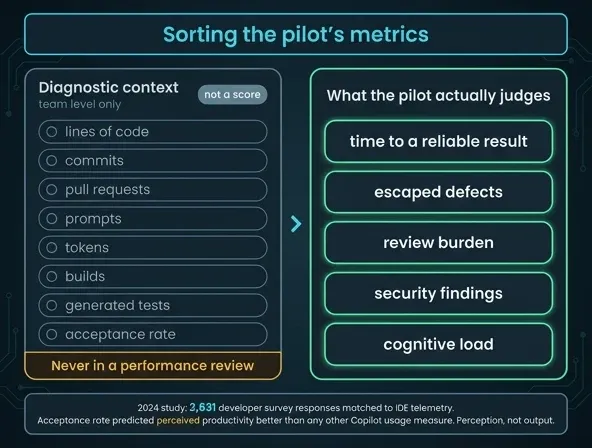
All these numbers, lines of code, commits, pull requests, prompts, tokens, builds, generated tests, and acceptance rate are just diagnostic context, not scores. A 2024 study compared 2,631 developer survey responses with IDE telemetry and found that acceptance rate predicted perceived productivity better than any other Copilot metric. This helps us understand how people use the tool, even if it doesn’t measure output. An accepted suggestion might be rewritten in an hour, rejected in review, or shipped in a change that helps no one.
Here’s the claim I stand by: AI is a force multiplier for a development system that already works - clear tasks, good context, fast feedback, real review capacity, and tests that mean something. If you don’t have those, faster code just means more to check later.
So focus on how long it takes to get a reliable result, not on how much code the tool can produce.