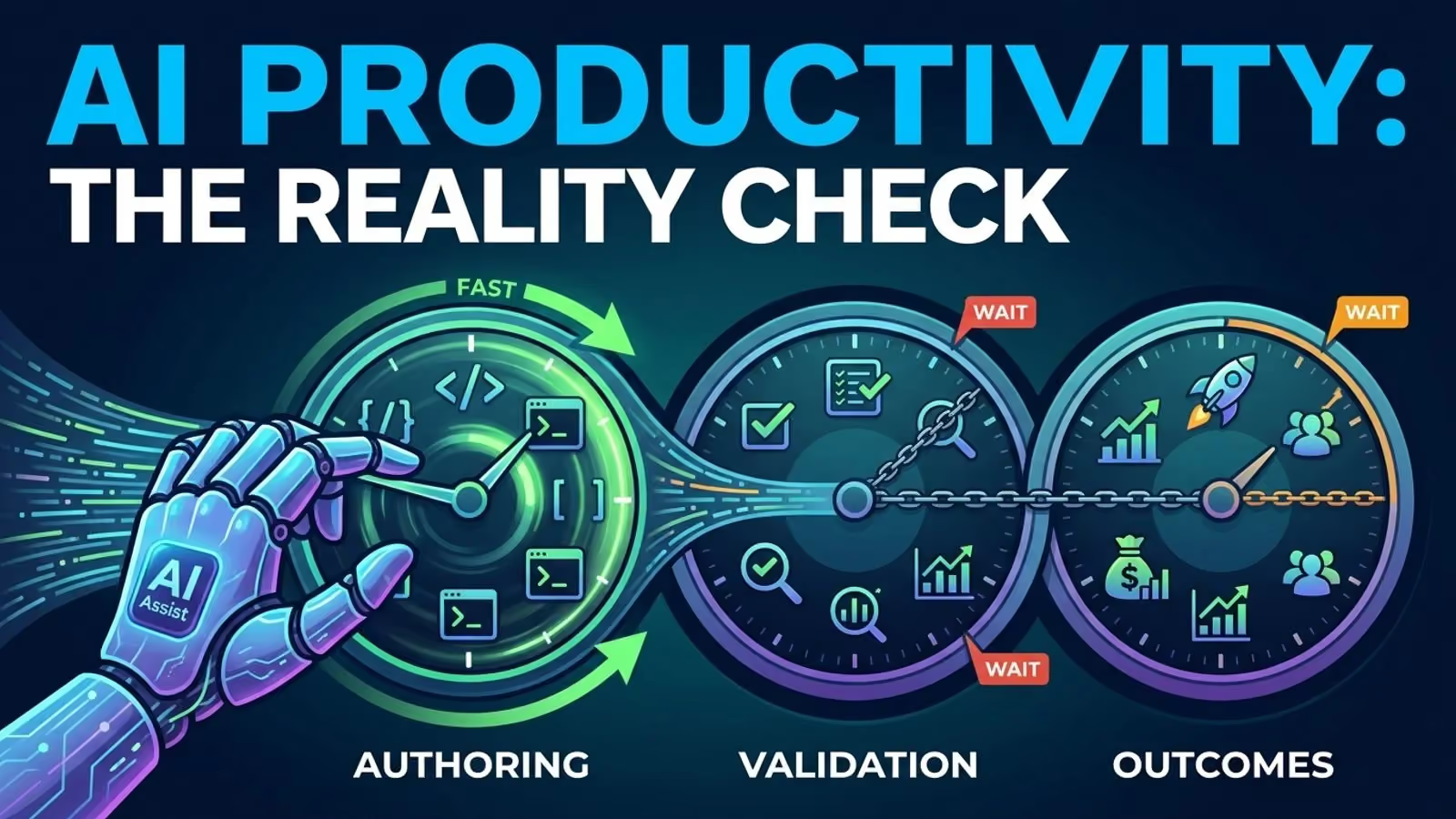
Right now, somewhere, a developer is installing their fourth new app this month. The test suite still takes eight minutes to run, the review queue still takes a whole day, and only one person knows the deploy steps. That gap is what really needs attention. Even though there are more and more productivity apps for developers, most guides just list products without first looking at what actually slows down the work.
A tool might help you type faster, but it doesn’t change what really matters.
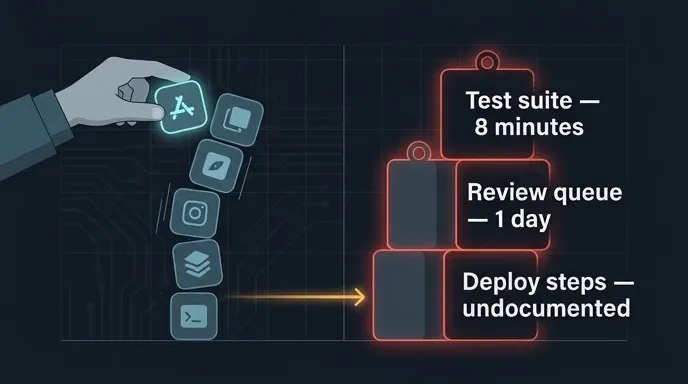
The best developer productivity tools remove a bottleneck
In 2021, the researchers behind the SPACE framework pointed out something that still gets overlooked: productivity has many sides, and no single measure like commits, pull requests, or lines of code can capture it. GitHub’s own Good Day study, though small and internal, found the same thing. Activity on the platform was only part of what made developers feel they had made progress or done good work.
This year’s DevEx paper gives more practical advice. Here are three things to think about:
- Feedback loops: How long does it take between carrying out an action and finding out if it has worked?
- Cognitive load: how much do you need to keep in your head in order to carry out one change?
- Flow: How often is your work broken up? A study of 4,910 tasks from professional developers found that how disruptive an interruption is depends on its timing, source, and context. Self-interruptions are the most disruptive.
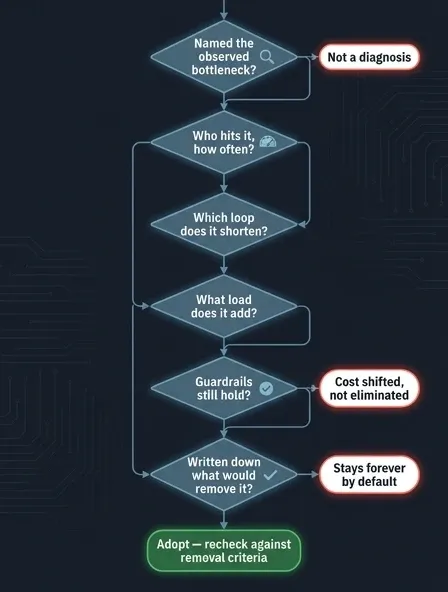
So before adding anything, a short interrogation:
- What is the bottleneck that has been observed? Saying “we need to be faster” doesn’t amount to a diagnosis; it is the fact that the median local test loop is eight minutes that does.
- Who is responsible for doing it and how frequently? A delay that occurs every day throughout the team is quite different from a task that a specialist carries out once a month.
- Does it reduce the length of the editing loop, the testing loop, the review loop, the deploy loop, the discovery loop or the onboarding loop?
- What kind of load does it add? Think about setup, configuration, training, notifications, upgrades, and handling failures. All of these need to be considered.
- What should not happen? If the work is completed more quickly even though the number of defects that have escaped, the number of flaky tests, or the amount of review effort increases, then you have just shifted the cost rather than having eliminated it.
- What kind of evidence would cause you to delete it? You should state that clearly beforehand, or else the tool will remain and will not be deleted.
A practical stack of software developer productivity tools
Productivity tools used by most programmers can be divided into six categories; instead of grouping them according to the vendor that sells them, one should group them according to the kind of loop they resolve.
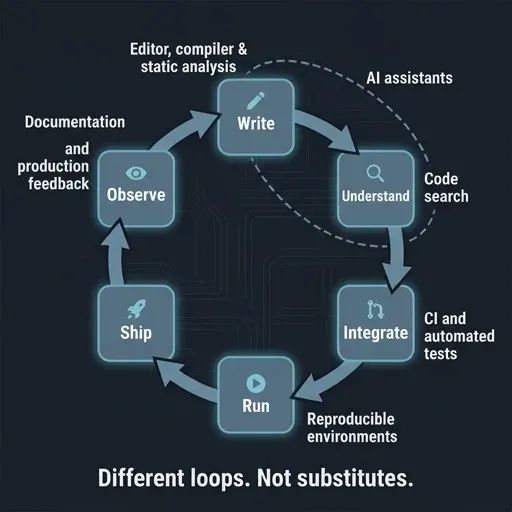
Editor, compiler, and static analysis: Google’s explanation of building static analysis is one of the most honest out there. The separate bug dashboard was ignored, and warnings just created a backlog. False positives quickly lost people’s trust. What worked was sending clear, fixable findings into the compiler and code review process, where people were already paying attention, and counting the number of defects fixed instead of the number of warnings. There should be fewer analyzers, running earlier and quietly, and ideally offering a fix.
Code search: In cases where the requirement is to understand a system rather than to write new code, search is the appropriate tool. GitHub made its revamped code search generally available in May, including features such as symbol search, regular expressions, boolean operators, and filters by path and language. It justifies its existence to the extent that it reduces the number of steps needed to answer questions such as “where is this defined?”, “who owns it?”, or “what will break if I change it?”.
AI assistants: In a controlled experiment, 95 professional developers implemented a single JavaScript HTTP server and the group that used Copilot completed the task 55.8% faster. This result refers to one particular task and one specific language, not a general figure for software development. The June survey by Stack Overflow showed a high level of interest together with considerably less trust in the accuracy of the responses, and a security assessment carried out in 2021 discovered that around 40% of the 1,692 programs it produced in 89 different scenarios contained vulnerabilities. Use it as a quick draft generator but make sure that review, testing and security checks are carried out.
See The AI Productivity Paradox for the more detailed explanation of why adoption and productivity figures continue to fail to match.
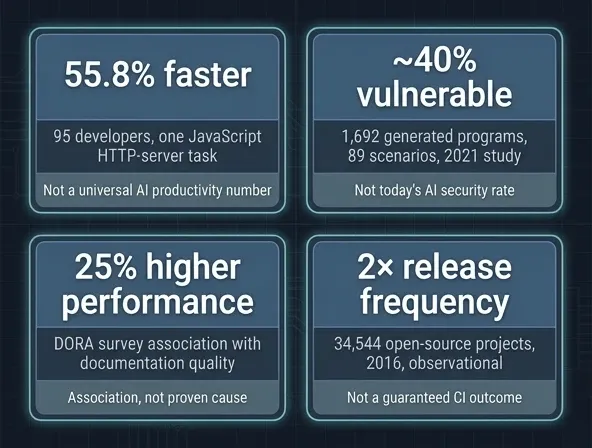
CI and automated tests: A study from 2016 involving 34,544 open-source projects found that those that used CI released twice as frequently and merged pull requests more quickly, meanwhile also documenting the setup, maintenance, and build-time costs. The study was observational, focused on the older ecosystem and dealt only with open source. The mechanism still exists because of earlier, repeatable feedback; however, slow queues and flaky tests turn this mechanism into a new delay.
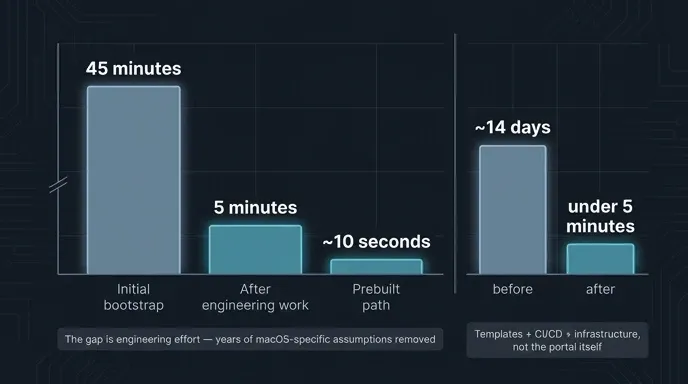
Reproducible environments: GitHub has transferred most of its GitHub.com development to Codespaces and has reduced the bootup time from 45 minutes down to five minutes and then to about ten seconds when using the prebuilt option. However, you should read the rest of that account since the figure resulted from substantial efforts to eliminate years of assumptions specific to macOS. For a small and stable project, a tested setup script generally performs better than a remote service.
Documentation and production feedback: The findings of DORA, which were released two weeks ago, showed that high-quality documentation was linked to a 25% increase in team performance and had a positive effect on practices such as continuous integration. The same principle applies further on: logs, traces, and deploy markers justify their existence by linking a symptom to a specific change and to an owner. Having another dashboard is not the same as providing another answer.
Mac developer productivity tools that earn their place
The number of productivity applications for Macs tends to build up, and it’s better to organise them by the kind of work they’re used for, having one tool for each type of job:
- Setup. The Homebrew - 4.0 version arrived in February, together with a versioned bootstrap script. Make sure that all the items your team relies on are pinned, since that is how minor upgrades lead to drift.
- Work surface. Stick with the same editor and terminal as before. iTerm2 combines split panes, a hotkey window, profiles, and shell integration in one app. Warp’s AI became available as a free beta in March. Before using it on a shared setup, check what data leaves your machine.
- Navigation. You only need one launcher. Raycast combines running commands, executing scripts, searching for files, and managing windows in one interface. Alfred 5 gives existing users a new workflow editor and automation features. Pick just one. If you use both, you’ll spend more time configuring launchers than actually using them.
- Layout. Rectangle handles window placement with the keyboard, worth it if repeatedly arranging layouts actually takes up a lot of your time.
- Runtime. Use containers only if the project requires Linux compatibility or true reproducibility. OrbStack 1.0 was released last month as a solution focused on the Mac platform for running containers and lightweight Linux systems, although Docker Desktop is still the one that most teams adopt. Make sure to check both compatibility and licensing before deciding to split the team.
- Focus. Notification and meeting boundaries, before another app.
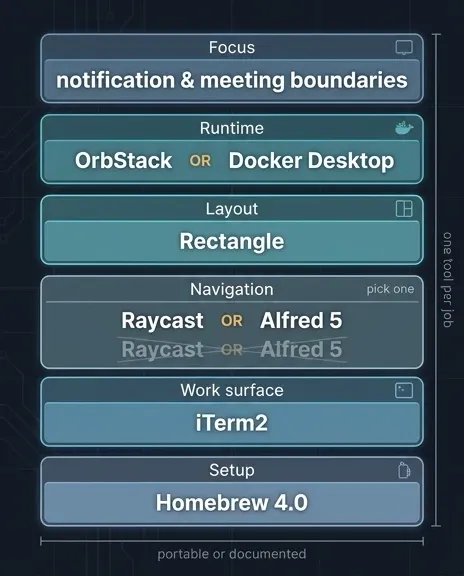
One cautionary note: a personal shortcut is no harm until it gradually turns into infrastructure, so any item on which the team relies should remain portable or should have a documented equivalent.
When you need a developer productivity platform
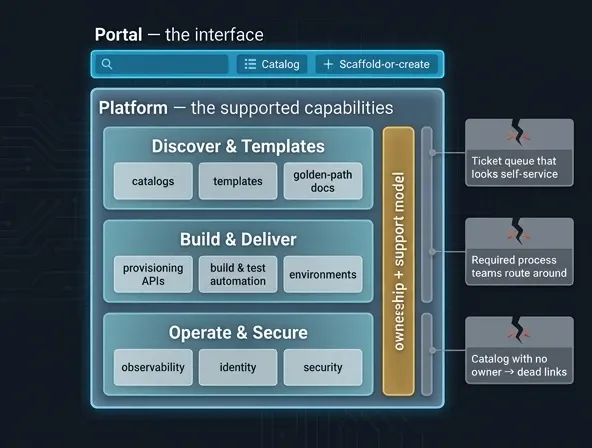
A tool can enhance one loop; it is the ability to coordinate multiple such loops around a single supported route that turns it into a developer productivity platform. According to Gartner, platform engineering involves the construction and operation of self-service internal developer platforms, and it is predicted that by 2026 80% of software engineering organizations will have platform teams, three-quarters of which will include self-service portals. The April white paper from the CNCF lists the following capabilities: catalogs, templates, golden-path docs, provisioning APIs, build and test automation, environments, observability, identity, and security.
The interface is the portal and all that lies behind it constitutes the platform.
You probably need one when several of these hold:
- Several teams continually rework the same setup, deploy, or ownership issue.
- A ticket to a specialist team has to be obtained in order to carry out routine operations.
- The supported path, the service owner, and the current production status cannot be found.
- The use of variation is actually leading to extra expenses in the areas of security, reliability, or maintenance.
- There is a team that can regard developers as customers and keep the path going.
A small shop offering only a few services? A repo template, a setup script, a shared CI workflow, and concise documentation are better than having to operate a portal.
Problems tend to show up the same way at different companies: there’s a ticket queue that looks self-service, a required process that adds extra steps so teams work around it, and a catalog with no owner that turns into a bunch of dead links. Spotify’s way of setting a preferred path helps by making the recommended route clear and giving teams a real alternative if they need it. They said they cut one standard setup from about 14 days to under five minutes, thanks to templates, CI/CD, and the infrastructure behind the portal, not the portal itself.
What I expect developer tools to do next
- The assistants will go beyond autocomplete and move on to search, explanation, testing, and multi-step assistance, thereby increasing the value of verification tools rather than decreasing it.
- Platforms will emerge as the standard solution to toolchain sprawl, and the ones that succeed will act like products, being evaluated based on adoption and task success rather than the number of integrations.
- The measurements will continue to move away from a single output figure, matching together what the developers report with the system signals.
- Launchers will keep absorbing each other’s jobs, so the Mac app collection gets smaller.
- Remote environments will continue to expand while the dilemma between local speed and cloud consistency remains unresolved.
Start with the constraint
Find the bottleneck before you look for new tools. Measure the loop you want to shorten, keep an eye on defects, security issues, review effort, and maintenance, and be ready to remove anything that doesn’t prove its value. The best developer productivity tools aren’t the ones with the most features. They’re the smallest set that solves your real constraint.