
What Are Cloud Functions?
Cloud Functions for Firebase is a serverless framework that runs your deployed code in response to events. These events can come from other Firebase services or from external sources such as HTTPS requests.
This article assumes some familiarity with the basics. For a primer on adding Cloud Functions to a Firebase project, triggering a function, or deploying one, see the official documentation.
Purpose of This Article
This article explains an architecture that helps keep Cloud Functions code readable and manageable as your project grows. Good examples of Node.js backend architecture are hard to find online, so I hope this will be helpful for Node backend developers in general, not just those using Firebase.
The examples use typescript, but the same concepts work for javascript too. Try to focus on the ideas, not just the syntax.
Testing is out of scope for this article. I’ll show where a test folder fits into the structure, but writing test cases for Cloud Functions deserves its own dedicated article.
The Problem We’re Solving
To make the architecture more concrete, we’ll use a small example. Imagine we have two Firestore collections: Children (with a Child class) and Ages (with an Age class). Notice the naming convention: collection names are plural, while the class names are singular.
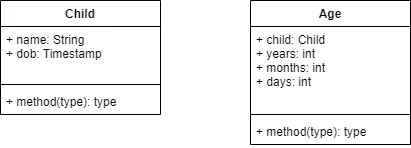
The problem itself is simple: when a document is created in the Children collection, a Cloud Function should trigger automatically, calculate the child’s age, and write the result as a new document in the Ages collection.
Basic Folder Structure
Check the documentation linked above to set up a new Cloud Functions project. Be sure to select typescript and enable linting. At first, you’ll only see a src folder and a node_modules folder. The lib folder appears automatically after you compile the TypeScript code, and you’ll create a test folder yourself when you start writing test cases.
For javascript users, the project starts even simpler: just a node_modules folder and an index.js file. I recommend creating a lib folder and moving index.js inside it. This helps separate your implementation code from your test code. After that, add the following key-value pair to package.json:
"main": "lib/index.js",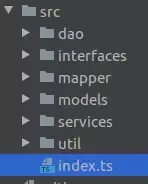
The image above shows the basic folder structure inside src:
| Folder | Description |
|---|---|
| dao | Reads from and writes to Firestore |
| interfaces | Shared interfaces and abstract classes used across the project |
| mapper | Converts Firestore data models to internal models, and vice versa |
| models | Internal data models (entities) |
| services | Core business logic |
| util | Utility code |
Interfaces
This folder holds interfaces and abstract classes shared across the project.
Handler Interface
This interface defines the functions that run when a Cloud Function is triggered. In our case, the function should trigger whenever a new document is added to Firestore, so AbstractHandler defines the shape of the code that runs on that trigger.
// abstractHandler.ts
export abstract class AbstractHandler {
  async onCreate(snap: DocumentSnapshot, context: EventContext): Promise<any> {
    throw new Error("onCreate not implemented yet!!");
  }
}
This is the function prototype for an onCreate trigger. If your code handles other trigger types, you can declare them here as well. I’ve added a few more in the GitHub repository for this project.
Database Model
Every model is created by extending this abstract class, which holds some basic information that every model in the system needs.
// dBModel.ts
export abstract class DBModel {
  ref: DocumentReference | undefined;
  id: string | undefined;

  protected constructor(ref?: DocumentReference) {
    this.ref = ref;
    this.id = ref?.id;
  }
}
I’ll go into more detail on how ref and id are used in the Models section below.
Mapper Interface
This interface is used to convert Firestore data structures into internal models, and back again.
// mapper.ts
export interface IMapper<T extends DBModel> {
  fromSnapshot(snapshot: DocumentSnapshot) : T | undefined;
  toMap(item: T): DocumentData;
}
What’s Missing
Ideally, the data access layer would have its own interface too, adding another layer of abstraction. Each model’s DAO would then implement that interface instead of being written from scratch. I’m leaving that out here to keep the example focused.
Models
Instances of classes in this folder represent Firestore documents. In principle, these classes shouldn’t depend on anything else, but in this implementation, they depend on Firestore’s DocumentReference class. This makes it much easier to convert these models back into Firestore-storable data; you can think of it as similar to using keys (IDs) in MySQL. If you want to avoid that dependency, you can store the document’s path instead. Just change the ref field in DBModel and update the mapper implementation for the model.
As mentioned above, the ref and id fields are used when converting models to and from Firestore data structures. ref holds the reference to the document storing the model’s data. id matters when creating the document: by default it’s equal to ref’s documentId when ref isn’t null. Its role will become clearer in the DAO section.
// age.ts
export class Age extends DBModel {
  static readonly CHILD_FIELD = 'child';
  static readonly YEARS_FIELD = 'years';
  static readonly MONTHS_FIELD = 'months';
  static readonly DAYS_FIELD = 'days';

  child: DocumentReference | undefined;
  years: number | undefined;
  months: number | undefined;
  days: number | undefined;

  constructor(ref?: DocumentReference, child?: DocumentReference, years?: number, months?: number, days?: number) {
    super(ref);
    this.child = child;
    this.years = years;
    this.months = months;
    this.days = days;
  }
}

// child.ts
export class Child extends DBModel {
  static readonly NAME_FIELD = 'name';
  static readonly DOB_FIELD = 'dob';

  name: string | undefined;
  dob: Date | undefined;

  constructor(ref?: DocumentReference, name?: string, dob?: Date) {
    super(ref);
    this.name = name;
    this.dob = dob;
  }
}
Notice the static variables declared inside each model. They’re used to pull data out of the Firestore snapshot. Since a snapshot returns a plain JavaScript object, you can think of it as a set of key-value pairs. Using these variables instead of string literals to access that data helps reduce the chance of typos.
You’ll see these variables used in the mapper classes below. Declaring them on the model adds another layer of Firestore-specific dependency to these classes. You could avoid that by declaring them in the mappers instead, but I prefer keeping them here.
Mappers
As mentioned above, mappers convert Firestore data structures into internal models when reading, and do the reverse when writing. For our two models, we need two corresponding mappers.
// ageMapper.ts
export class AgeMapper implements IMapper<Age> {
  fromSnapshot(snapshot: FirebaseFirestore.DocumentSnapshot): Age | undefined {
    if (snapshot === null || snapshot === undefined) return undefined;
    const data = snapshot.data();
    if (data === null || data === undefined) return undefined;

    return new Age(snapshot.ref, data[Age.CHILD_FIELD],
      data[Age.YEARS_FIELD], data[Age.MONTHS_FIELD], data[Age.DAYS_FIELD]);
  }

  toMap(item: Age): FirebaseFirestore.DocumentData {
    return {
      [Age.CHILD_FIELD]: item.child,
      [Age.YEARS_FIELD]: item.years,
      [Age.MONTHS_FIELD]: item.months,
      [Age.DAYS_FIELD]: item.days,
    };
  }

}

// childMapper.ts
export class ChildMapper implements IMapper<Child> {
  fromSnapshot(snapshot: DocumentSnapshot): Child | undefined {
    if (snapshot === null || snapshot === undefined) return undefined;
    const data = snapshot.data();
    if (data === null || data === undefined) return undefined;

    return new Child(snapshot.ref, data[Child.NAME_FIELD], data[Child.DOB_FIELD]?.toDate());
  }

  toMap(item: Child): DocumentData {
    return {
      [Child.NAME_FIELD]: item.name,
      [Child.DOB_FIELD]: item.dob ? Timestamp.fromDate(item.dob) : null,
    };
  }

}
Notice that both mappers use the static variables declared on the model classes instead of string literals when reading and writing Firestore data. This small habit helps minimize mistakes.
DB Utility
The util folder stores utility data for the system. Right now there’s a single file, dBUtil.ts, which holds the names of the Firestore collections the system uses.
// dBUtil.ts
export abstract class DBUtil {
  static readonly AGE  = 'Ages';
  static readonly CHILD = 'Children';
}
Notice the naming convention: each collection’s name is always plural and written in camel case, while the variable that stores it uses the singular form.
Data Access Objects (DAO)
DAO classes fetch and store data in Firestore. Each one has two jobs:
- Access Firestore
- Map between Firestore data and internal models as required
For this example, we only need a DAO for storing documents in the Ages collection.
// ageDAO.ts
export class AgeDAO {
  firestore = admin.firestore();
  mapper = new AgeMapper();

  async add(age: Age) {
    const collectionRef = this.firestore.collection(DBUtil.AGE);
    const docRef = (age.id === null || age.id === undefined) ? collectionRef.doc() : collectionRef.doc(age.id);
    age.ref = docRef;
    await docRef.set(this.mapper.toMap(age));
  }
}
A model that still needs to be stored in Firestore won’t have a document reference yet, so its ref field is null. The documentId of the new document is determined by the model’s id field instead: if id is null, the document ID is generated randomly; if a string was provided, that string becomes the document’s ID.
Once the document is created, the DAO updates the model’s ref field. That guarantees the model stays linked to its corresponding document going forward. So elsewhere in the project, you can update the same model and save it again later without worrying about creating a duplicate document.
I’ve added some more functionality to the DAO, like updating a document, in the GitHub repository for this project.
In a separate article, I’ll cover the Repository design pattern as an alternative to DAO, which helps avoid the bloat that tends to build up inside DAO classes and adds another layer of abstraction to the code.
Services
This is the core of the application, where all the business logic lives. The package is divided into sub-packages, one for each Cloud Function. Each sub-package has a Handler file to catch the function’s trigger, along with a set of Service files. You can create multiple service files to implement whatever logic the Cloud Function needs, and the handler calls them as needed.
// createAgeHandler.ts
export class CreateAgeHandler extends AbstractHandler {
  async onCreate(snap: FirebaseFirestore.DocumentSnapshot, context: EventContext): Promise<any> {
    const childMapper = new ChildMapper();
    const child = childMapper.fromSnapshot(snap);
    if (child === null || child === undefined) {
      console.log("Console log");
      return;
    }
    await new CreateAgeService().processChild(child);
    console.log("All Done!");
  }
}

// createAgeService.ts
export class CreateAgeService {
  private ageDAO = new AgeDAO();

  childToAge(child: Child): Age {
    const now = moment();
    const duration = moment.duration(now.diff(child.dob));
    return new Age(undefined, child.ref, duration.years(), duration.months(), duration.days());
  }

  async processChild(child: Child): Promise<any> {
    const age = this.childToAge(child);
    await this.ageDAO.add(age);
  }
}
A handler’s job is to:
- Validate input data, if required
- Call the necessary service methods
Services are the brains of the application. Processing, business logic, and saving data all happen here. It’s usually better to use a separate class for each responsibility, although in the example above, I put data processing and the Firestore write in the same class.
If you write interfaces to abstract your service and DAO classes, you’ll need to inject the concrete implementations into your handlers and services somehow, either with a service locator pattern or by passing dependencies in through the constructor. I prefer constructor injection.
Sometimes, you’ll need the same service functionality in different Cloud Functions. Since each function’s package is written separately, sharing services across packages can feel a bit awkward. If you want to keep that separation, you could duplicate the code, but I prefer calling the relevant function in the other package instead of duplicating logic. Duplicated code is not a good practice in a project. If you have an interface for your service classes, make sure any shared functions are included in that interface too.
Connecting Everything
Finally, you need to connect the handler to the index file, this is where the appropriate handler function gets executed.
// index.ts
if (admin.apps.length === 0) admin.initializeApp();

export const createAge = functions.firestore.document(`${DBUtil.CHILD}/{childId}`)
  .onCreate(new CreateAgeHandler().onCreate);
And that wraps up this approach to writing Firebase Cloud Functions. You can find the full codebase on GitHub - clone it and take it for a spin.
See you in another article. Bye!
Typescript Cloud Functions - Firebase - An example project demonstrating a simple Cloud Function trigger, written to explain a clean way to write Cloud Functions.