When was the last time you typed in a password without thinking, this is dumb? That feeling makes sense. Passwords can be phished, guessed, cracked, reused across sites, and eventually leaked in breaches you might never hear about. They’re the most common way apps check your identity, but also the weakest.
Let’s start with authentication, which is how a system confirms your identity. It works best when it doesn’t use passwords at all. A fingerprint, face scan, physical token, or a certificate on your device is better than a password you have to remember and someone else has to store. There’s nothing to type, nothing to forget, and nothing sitting in a database waiting to be stolen.

You don’t have to build every login system from scratch. Federated login, like signing in through Google, Facebook, Azure AD, or another trusted identity provider, lets someone else handle the hard part. With fewer passwords in use, there are fewer chances for leaks. User management becomes simpler when you’re not holding all the keys, and signing in is easier for users.
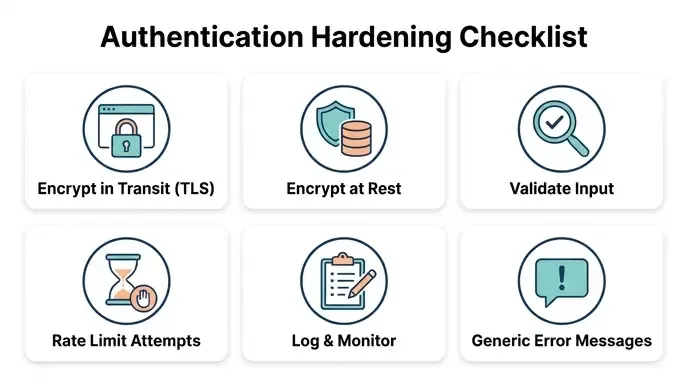
No matter which method you use, the underlying security has to be solid. Use real encryption in transit, like TLS. Keep sensitive data secure at rest. Always check user input, especially email addresses, before trusting it. Add rate limits or a captcha to slow down anyone trying to attack the login page. Keep a record of what happened and when, so you have a trail if something goes wrong. If there’s an error during login, don’t give attackers clues. A simple message like “something went wrong” or a quiet redirect is better than saying “no account found with that email.”
Some of the worst attacks don’t even involve a person. Bots use credential stuffing and dictionary attacks, trying many combinations until one works, often using data from other breaches. Multi-factor authentication stops most of these attacks because a password alone isn’t enough. Beyond that, check new passwords for real randomness, not just length. Blacklist passwords that are already known to be compromised. Block suspicious IPs and devices, and flag unusual behavior. You can use machine learning or behavioral biometrics for this. The goal is to make it too costly for bots to keep guessing.
Still, if passwords are the main protection, the problem isn’t solved. If you can’t get rid of passwords yet, make them as strong as possible. Set a real minimum length and don’t make the maximum too short. Allow any characters, including symbols. Hash every password with a tool made for the job, like bcrypt or argon2, not something faster or simpler. Add salt and pepper, and rotate passwords on a schedule instead of keeping the same one for years. A strength meter helps people choose better passwords, and combined with blacklisting, it prevents most common mistakes.
flowchart LR
    A[Plaintext password] --> B[Add salt<br/>random, per-user]
    B --> C[Add pepper<br/>app-wide secret]
    C --> D[Hash function<br/>bcrypt / argon2]
    D --> E[(Stored hash)]

    style A fill:#f66,color:#fff
The bigger lesson is this: don’t build authentication systems yourself. It seems simple until you try, and by then you might miss issues that experts have already solved. Protocols like OAuth2, OpenID Connect, SAML, and Kerberos exist because others have already found the tricky parts. Use these standards and the tools built around them so you don’t have to learn the hard way.
Read OAuth 2.0 Essentials for a detailed walkthrough of OAuth2 roles and grant flows.
Getting through authentication is only half the story. Once a system knows who you are, it still needs to decide what you can access. That’s a different challenge, with its own risks.
The main principle is least privilege: give people access only to what their job needs, nothing extra or “just in case.” It sounds obvious, but it’s often skipped. This often occurs because authorization is incorporated late, rather than being integrated into the initial planning phase alongside other core aspects like business logic, data models, user roles, access rules, and security requirements. These elements should all be decided early on to avoid shortcuts from being embedded into the system.
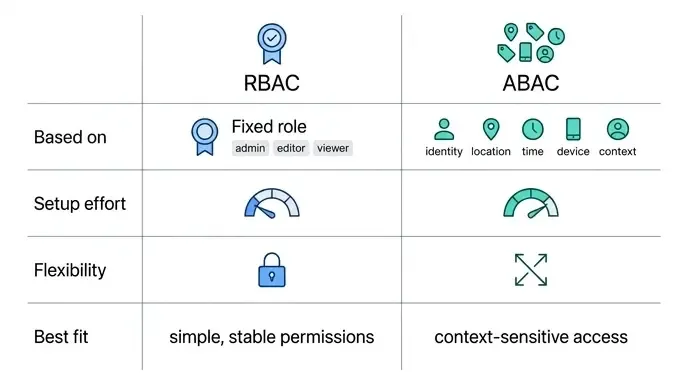
The most common way to organize access is role-based access control, or RBAC. People get roles based on their job, like admin, editor, or viewer, and each role has a set of permissions. Instead of managing access for each person, you manage a few roles, and everyone in a role gets the same permissions. This makes things easier to understand, audit, and maintain, with less redundancy over time.
RBAC doesn’t work well when access needs to change based on context that a fixed role can’t cover. That’s where attribute-based access control, or ABAC, comes in. ABAC looks at attributes like who is asking, where they are, the time, the device, and the situation. It takes more effort to set up than RBAC and is more detailed, but it can make decisions that roles alone can’t handle.
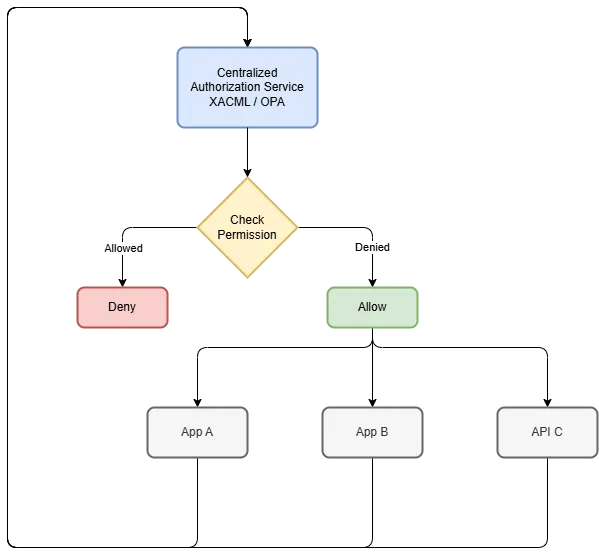
Once your system grows, it’s best to move all access control logic out of the application itself. Instead of spreading access checks across every function and endpoint, use a centralized service or an external framework like XACML or OPA. This keeps authorization separate from business logic, ensures all apps use the same rules, and makes updating policies easier. It also makes the system easier to scale, reuse, and maintain than having scattered checks everywhere.
Before a request reaches the database or runs any business logic, it needs to pass one more check: does it have permission to do what it’s asking? It doesn’t matter how strong your roles or attributes are if this check is missed. Every call, endpoint, method, and operation should all go through this check to keep everything secure and consistent. There shouldn’t be any exceptions or routes that bypass it, ensuring everything stays properly in place.
This isn’t a complete checklist. What’s considered “enough” depends on what you’re building and what’s at risk if it fails. A to-do list app and a banking API have very different needs, even if both “have authentication.” If you get the basics right, you’ll have better security, smoother sign-ins, a more reliable system, and less panic when something goes wrong. But none of this replaces testing. Run risk assessments and test your own system before someone else does.
Remember that password you rolled your eyes at earlier? That’s a fair reaction. Just make sure it’s not the only thing protecting your system.